I would like to use my AKM320 MIDI keyboard but haven’t learned how. I’ve read MIDI sections in the manual and watched the MIDI videos.
If someone could guide me from the very beginning to learn what I am missing, it would be most appreciated.
I can see the piano I selected, and the screenkeys follow my keyboard, but I just don’t hear anything!
when I record and play my keyboard, I see little marks like piano roll, but no sound.
Robert,
since you see the notes in the pianoroll and the keys highlighting it appears that the MIDI input is working, but the audio output is not. Can you hear audio tracks? Try adding a new instrument track (e.g. Piano), then click on the on-screen keys with the mouse to verify that you can hear the piano. If you can you should then also be able to hear the notes when playing the physical MIDI keyboard.
Flavio.
Yes, other tracks are heard in this song. Yes, I see the on-screenpiano respond to the same notes I touch on my MIDI.Where do I look for the audio output?
Do I need an audio interface?Or does theUSB cable go from keyboard to USB in on my PC? For now I have the USB cable from keyboard toPC.
I don’t know I did, but many (not all) instruments work!
If some instruments don’t play it might be because you’re playing keys that are not used by that instrument, for example a bass will only have low notes, higher notes will be silent, and the other way around for a violin. Check with the on-screen keyboard if the instrument plays, so you can test with the external MIDI keyboard out of the equation.
Also make sure that the audio engine is running. When it’s in the stopped state you should see the vertical Live sign left of the main position indicator (see screenshot below).
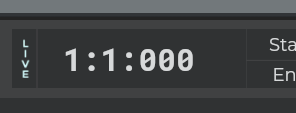
Flavio.