I am a violin teacher working at a music school, and I regularly use n-Track Studio on a tablet paired with an audio interface to record multi-track sessions for our school orchestra. Managing around 40 channels on a tablet screen is an incredible experience, but I run into a major issue during live setups and editing.
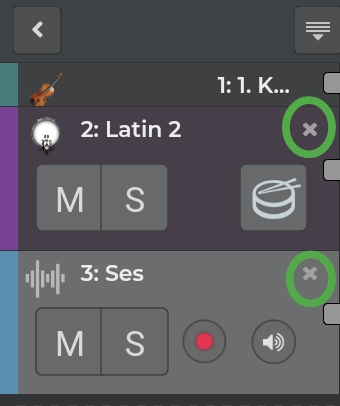
On the track headers, there is a prominent “X” button next to each track name. When working fast with a high track count on a touchscreen, it is very easy to accidentally tap this “X” button. As soon as it’s pressed, the track is deleted immediately without any warning or confirmation dialog. Re-adding the track, reassigning inputs, and setting everything back up wastes valuable time during recordings.
I would like to suggest a few improvements for future updates:
-
Confirmation Prompt: Adding a “Are you sure you want to delete this track?” popup when pressing the ‘X’ button.
-
Option to Lock / Hide Delete Buttons: An option in settings to lock track headers or hide the quick ‘X’ button altogether during recording sessions.
-
Delete via Context Menu Only: Moving track deletion into a long-press menu or options list rather than a single direct-click button on the UI.
Deleting a track with a single misclick is far too easy when working on touch devices, especially during high-stress ensemble sessions.
Has anyone else faced this issue, and could the development team consider adding a safeguard for track deletion?
Thank you!