Hi n-Track Team & Community,
I would like to suggest a few feature enhancements for the Audio Edit window to improve workflow speed and flexibility:
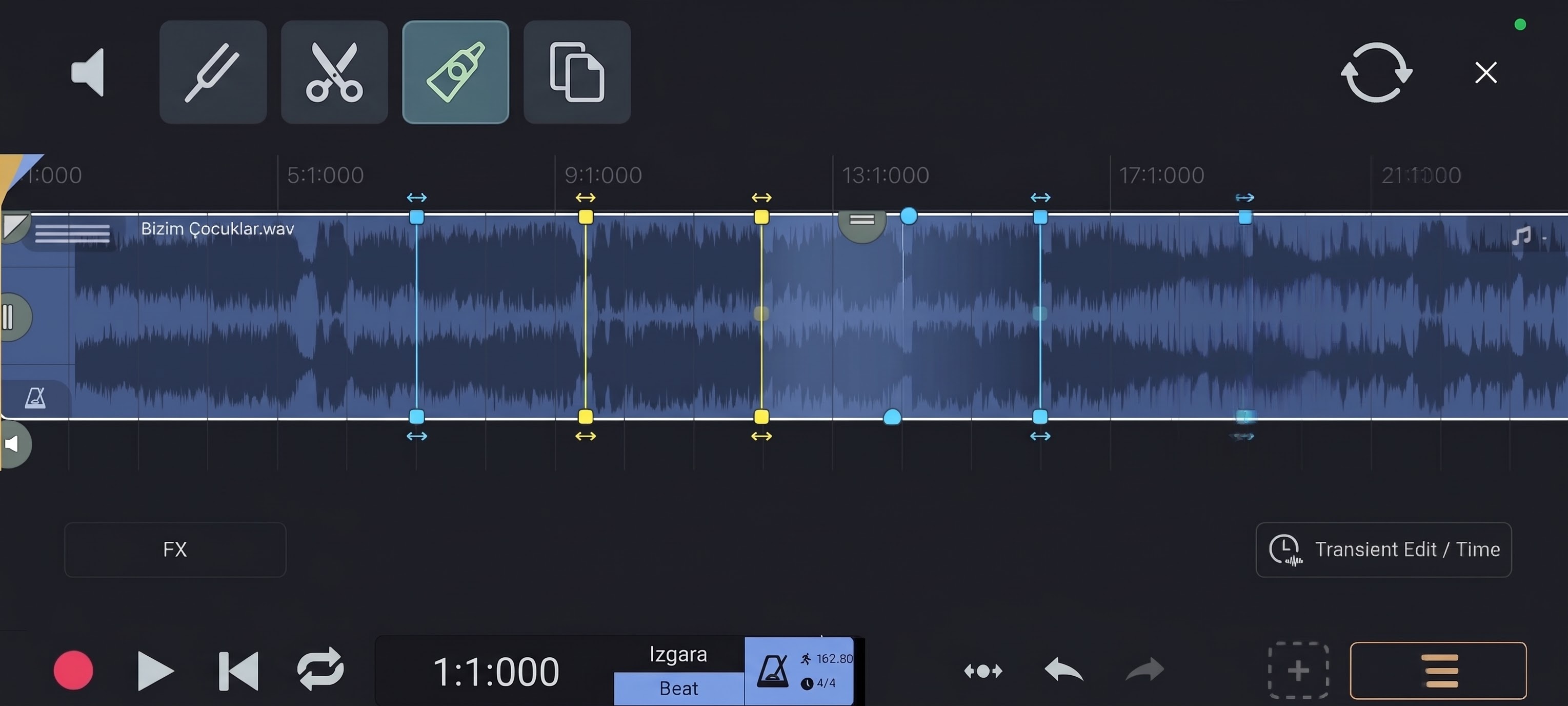
- Quick Edit Toolbar (Pencil Mode Integration):
- When editing with the Pencil tool, having dedicated shortcut icons on the toolbar would make editing much faster:
- Scissors Icon (Cut/Split): Quickly split audio clips at the playhead or cursor location.
- Glue Icon (Combine/Unite): Merge adjacent split clips back into a single audio region.
- Copy Icon (Duplicate): Easily duplicate selected audio regions or slices.
- When editing with the Pencil tool, having dedicated shortcut icons on the toolbar would make editing much faster:
- Manual Tempo & Time Editing (Transient Stretching):
- A manual time-stretching system directly on the waveform.
- Users should be able to manually insert custom transient markers (anchor points) anywhere on the audio waveform.
- By dragging these markers left or right, we can stretch or compress specific audio sections to fix timing issues or perform creative time-editing without affecting the rest of the clip.
Adding these features would make the Audio Edit window significantly more powerful and efficient for precise mobile/desktop editing.
Thank you for your hard work and continuous improvements!