I have a second problem. I tried to import my VST using TAL-NoiseMaker.exe and used the plugin, but after re-scanning, there is no sound. I tried to remove it, but I can’t remove it. I tried another plugin called Tyrell6N, but it’s the same case. Then I tried a second method — moving the .dll file and re-scanning — but it’s still the same. Finally, I tried reinstalling n-Track, but nothing changed. The same issue remains.Thank you again.
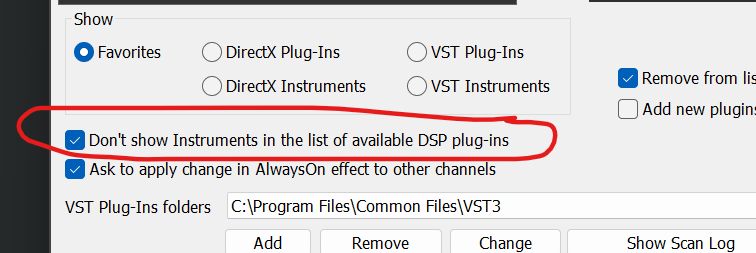
The two plugins you mentioned are instrument plugins, not effects. Probably you can see them in the list of effects because you may have unchecked the option to hide instruments in the list of effects (see the screenshot below). The default of the option is checked.
I was able to reproduce the fact that you cannot remove an instrument if added as an effect. It will be fixed in the next update due out in a few days. A workaround could be to use the Undo command, or alternatively uninstall the plugin. When I installed the plugins they both had an .msi installer so you should be able to uninstall them from the Windows add/remove software box, or alternatively you can manually remove the vst3 file. You can check the location of the vst3 file looking at the n-Track scan log (“Show scan log” in the Settings → Plugins box).