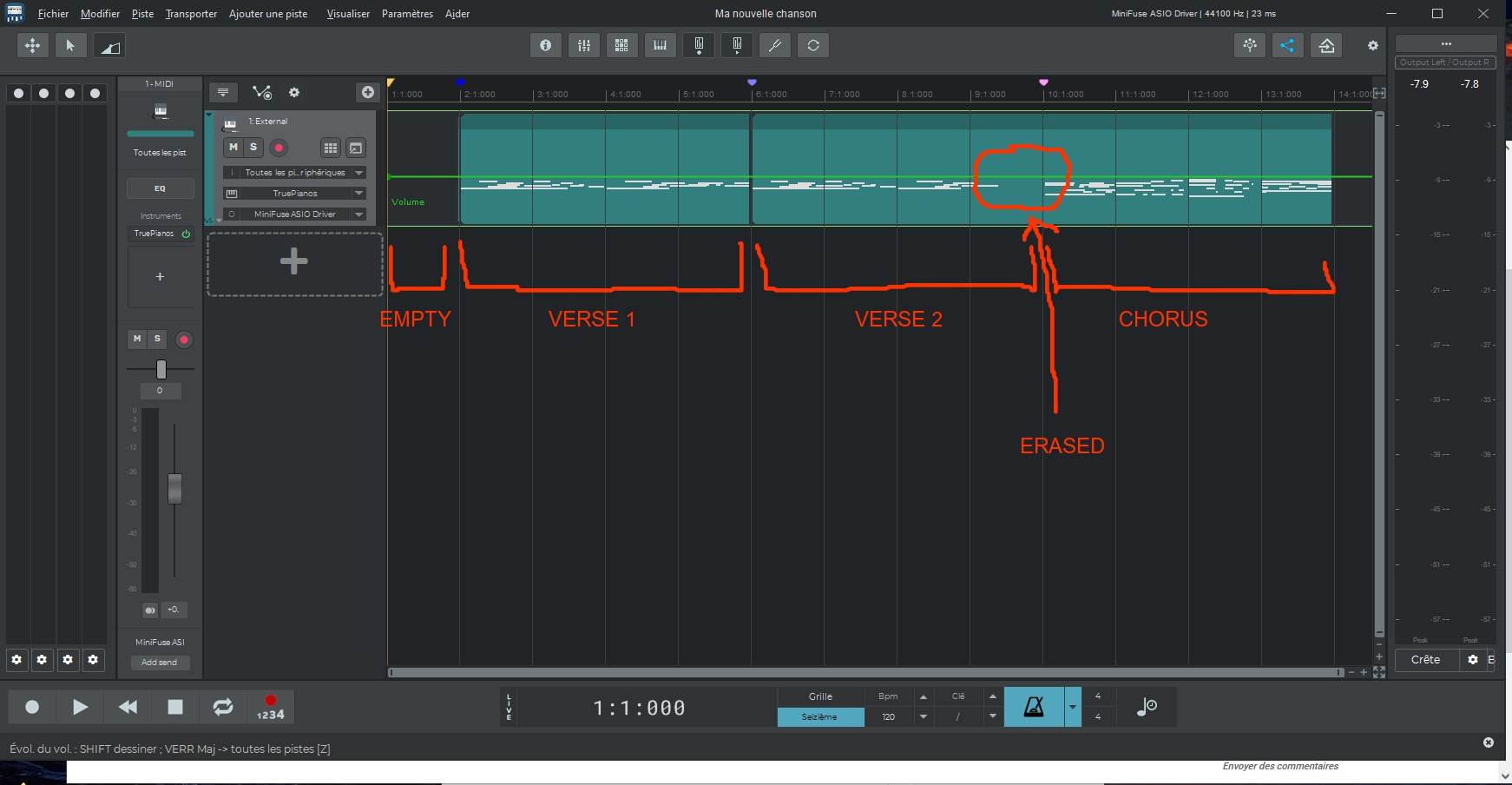
Hello. I have a few questions. I’d like to see all the measure numbers at the top, but each measure is 3 cm wide; isn’t there a way to zoom out to see further ahead? When I do zoom out, though, it only displays measures 1, 5, 9, 13… I’d like to see *all* the measures, just smaller. I left the first measure empty, as I always do. I recorded a piano part spanning three 4-bar sections. Measures 2 through 5 is the verse. Measures 6 through 9 is a copy of that verse. And for measures 10 through 13, I recorded a chorus. However, when I recorded the chorus (setting the metronome count-in to start one measure prior), it recorded my part correctly but erased the end of my second verse in measure 9. There’s a gap in measure 9, whereas it should look like measure 6 since I had copied it. Why is this happening? Finally, when I recorded the chorus (starting at measure 10), I would have liked the “return to start” button (the left-arrow button) to jump straight to measure 10 (for recording)—I even placed a marker there for that purpose—but it keeps returning to the very beginning of the song. Is it possible to configure a marker to act as the temporary start of the song, making it easier to align a new recording, or is that not possible? To be honest, I don’t quite understand the purpose of markers; I knew how they worked in Cubase—as shortcuts—but here, I’m not sure. There’s a “punch-in” feature, so why isn’t there a “punch-out”? The manual says that by pressing Shift and Grid simultaneously, I can access the quantization settings. But it doesn’t work for me. I think I’ve had n-Track for… two years now? It’s not easy… I have become a beginner again.
Hi Alain,
you can change the behavior of deleting existing notes when you overdub a midi part with the “Remove previous notes when overdubbing a midi part” option in the popup menu that appears clicking on the track’s input selection button.
As for rewinding, you can use a ‘Song start marker’: right click on the time axis at the desired point, then Place → Song start marker. When you then rewind (i.e. Backspace) it will go to that special marker. Alternatively you can use a regular marker and use the Ctrl+Shift+Left arrow to go back to the marker, or use the direct marker shortcuts (1, 2, 3 etc. keys).
As for the timeline measure labels, you can have a fine control over the zoom level by dragging the edge of the lower scrollbar. That way you might be able to make all measures appear but with larger zoom. When you zoom out, when the measure labels would overlap n-Track starts skipping measures. The way that it does could be more progressive, we’ll work on this for the next updates.
Flavio.
Thank you for your reply.