I noticed the track rendering thing for years...I think a rendered track would be a little longer due to verb or delay decay etc...BUT, Shouldn't they start in the same spot? When I reinsert a rendered file I end up cutting the begining and realigning the track....rendered without effects yields better results. I think it may have to do with the compensation for effect latency not being very good..I have noticed when tracks are off it is usually by the same amount as the effect latency..so I stopped using rendered tracks long ago...
Cheers, Ray
You got it Ray. When a start and end are specified by the user, the render should be EXACTLY what us requested. I remember guys having to insert extra "space" at the end of a track to "force" n to render the FX tails properly. I think Flavio fixed that quirk but this other one is still here.
Somebody will smack me for mentioning 'R' again... but there was a similar problem there too. The users on the forums squawked about it until Justin fixed it. Renders of whatever length are sample accurate now in all but the weirdest scenarios. I would think that it is doable in n as well.
Not to beat on this thing, but it is VERY important for a lot of users to be able to drop a rendered clip on a timeline in any app supporting time-stamped Broadcast Wave Files and have them align perfectly EVERY time. Time spent futzing and schmutzing a clip backwards and forwards a few ms to get it lined up costs money and kills creativity.
I have faith in the Flav-meister though. He'll sort it out... maybe not as fast as I would like... but he'll sort it out.
I'm using the Terratec Phase88 and EWS88 MT (an older model of the Phase88), both designed to use the same driver and control panel.
Thanks. So... we are both experiencing basically the same performance problems AND we have different makes of interfaces. I was wondering if maybe it was an EMU driver thing that n doesn't like. I guess not... it must be an internal n-Track "thang".
D. I forgot to mention that I’m using the ASIO driver. These Terratec units don’t work very well with the WDM or MME drivers. Also, when using n-Track, I can change the latency in the ASIO control panel all I want, but it never fixes the popping and snorting problems. With Reaper, it works great with any ASIO setting.
I’m using the latest E-Mu drivers with v5, (not doing test on 6 here) It seems to be plug in related, I can run plugs on 20+ tracks and start to get the hick-ups, changing the asio settings does nuttin. That’s with all native n plugs too.
R 20+ tracks (same project) 50ms asio, I tried to get it to skip with plug-ins, after about 70+ plug-ins it still was trucking along. Lowered asio to 2 ms and it skipped, raised to 10ms stopped it from skipping.
I really think it’s plug in related, v5 hasn’t give me any problems til mixing down and adding plugs.
Not in V5 Yaz. Flav put a checkbox in Prefs for V6 to enable/disable .NET. Also, I think it is OFF in V6 by default and if you try to start the navigator (uses .NET (WHY??)) it will ask if you wanna turn on .NET features.
I have V4, 5, and 6 on the same machine and don’t have any issues except this that I just sent a bug report on:
Track Channel EQ properties: At first couldn’t see the save or drop down menu for the equalizer. Then manually stretched the window to display them ok.
When saving a setting in the compressor only, I get Error messages saying: “Error Saving Presets Data” BUT IT SAVES ANYWAY! Also ntrack tries to send an error report to Flavio. If not connected to the internet this causes another error pop up and a connection dialog box to pop up in the background stating it “can’t connect to the internet”. The second two error messages pop up behind nTrack Studio that you can’t see. At this point my cpu was reaching 50%. Doesn’t matter if .net is activated or not. Happens every time I try to save compressor settings. Levi
I remember guys having to insert extra "space" at the end of a track to "force" n to render the FX tails properly.
No offense D but if one has FX on a track and they want to designate the end point, They obviously should let it play until all effects have tailed off. Stop the machine set your nodes and use that as the end point. Don't think you can expect Flavio to have all FX stop at the last note visible on the time line, where would the effect be. lol You must be tired or did mean something else? Levi
Levi - did you happen to get this error on install? I’m having the same problem I just noticed when saving eq/compressor settings. But I only get that on my vista daw not my XP here at work.
No… I mean Sonar, Reaper, Cubase et al allow the FX to run continuously. For example, let’s say you have a big reverb on a vocal track in n-Track, it’s playing and you press STOP. What happens? BANG! Nothing… no effect tail. The other guys let the FX decay naturally.
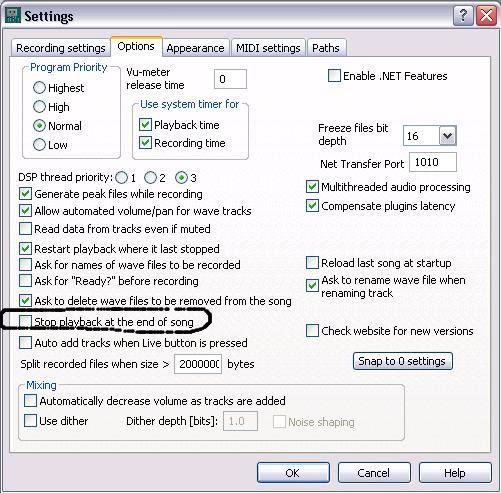
The other thing is if you have this option checked in Prefs (which can be handy)…
If you render the song and choose “Render entire song” (or whatever it says) with that option on n cuts the tails off of the FX in the rendered file. It’s not a killer problem. IF you know the “work-around”. (I hate that word.) It’s just the other guys have a better way of doing it. Maybe Flavio can improve this in V6. That’s all.
D
PS The goofy different file lengths of some renders IS a killer problem and needs fixed.
Levi - did you happen to get this error on install? I'm having the same problem I just noticed when saving eq/compressor settings. But I only get that on my vista daw not my XP here at work.
Yes I did PW, the only error during install for me. Thinking I had to be online during install for that error to not happen.
No... I mean Sonar, Reaper, Cubase et al allow the FX to run continuously. For example, let's say you have a big reverb on a vocal track in n-Track, it's playing and you press STOP. What happens? BANG! Nothing... no effect tail. The other guys let the FX decay naturally.
The other thing is if you have this option checked in Prefs (which can be handy)...
If you render the song and choose "Render entire song" (or whatever it says) with that option on n cuts the tails off of the FX in the rendered file. It's not a killer problem. IF you know the "work-around". (I hate that word.) It's just the other guys have a better way of doing it. Maybe Flavio can improve this in V6. That's all.
D
PS The goofy different file lengths of some renders IS a killer problem and needs fixed.
Hey D great comparison! Thx for explaining, I can see Flavio eating cheese drinking wine and thinking this one over Might take some thinking! He should appreciate good help from guys like you and the rest of the helpful folks here. Levi
Yes I did PW, the only error during install for me. Thinking I had to be online during install for that error to not happen.
Online is not the problem - I was online when I installed it on my laptop. If the 4 band EQ .dll doesn't register it must be why no saving happens. I'm gonna look in the directories and see if it's there anywhere.
No way to solve it for me Yaz. Still not sure if it’s an actual problem or just a lil bug.
I recall now and old 4 band EQ - was that one of Flavio’s plug-ins?
EDIT: This One. So what I think we have here is an old plug-in dll that may be needed for install or not? Flavio?
anyway the .dll file is there - I removed it to my desktop - clicked on n and it went into install instead of opening. Put the file back - it opened ok.
I’m not so good at beta testing so whatta I know. I’ll see if it’s some kind of ‘false positive’ on the save error - it seems to save anyway - whether it’s still there when you save the file then re-open is another question.
 No offense D but if one has FX on a track and they want to designate the end point, They obviously should let it play until all effects have tailed off. Stop the machine set your nodes and use that as the end point. Don't think you can expect Flavio to have all FX stop at the last note visible on the time line, where would the effect be. lol
  You must be tired or did mean something else?